Sharding and partitioning are techniques to divide and scale large databases. Sharding distributes data across multiple servers, while partitioning splits tables within one server. Sharding and Partitioning is a concept which is tightly coupled with database.

Horizontal Partitioning or Database Sharding: Horizontal partitioning, also known as database sharding. Database sharding is the process of storing a large database across multiple machines. A single machine, or database server, can store and process only a limited amount of data.
Database sharding overcomes this limitation by splitting data into smaller chunks, called shards, and storing them across several database servers. All database servers usually have the same underlying technologies, and they work together to store and process large volumes of data.
For example, suppose we store the contact info for customers. In that case, we can keep the contact info starting with name A-H on one partition/shards and contact info starting with name I-Z on another partition/shard.

Advantage: The horizontal partition/Sharding scheme is the most straightforward partitioning method. It involves dividing the database into separate partitions that have the same schema as the original database. This makes it easy to answer queries without having to combine data from multiple partitions.
Disadvantage: Data may not be evenly distributed across the partitions. For example, if there are many more customers with names that fall in the range of A-H than in the range I-Z, the first partition may experience a much heavier load than the second partition.
Vertical Partitioning: This Partitioning happens in Data level. Vertical partitioning is a powerful database feature that allows a table’s data to be split into smaller physical tables that act as a single large table. Partitioning is the database process where very large tables are divided into multiple smaller parts. This is also known as normalization. By splitting a large table into smaller, individual tables, queries that access only a fraction of the data can run faster because there is less data to scan. The main of goal of partitioning is to aid in maintenance of large tables and to reduce the overall response time to read and load data for particular SQL operations.
For example, in a social media application like LinkedIn, a user's profile data, list of connections, and articles they have written can be placed on separate partitions using vertical partitioning. The user's profile data would be on one partition, the list of connections on a second partition, and the articles on a third partition. This can help to improve the performance and scalability of the database.
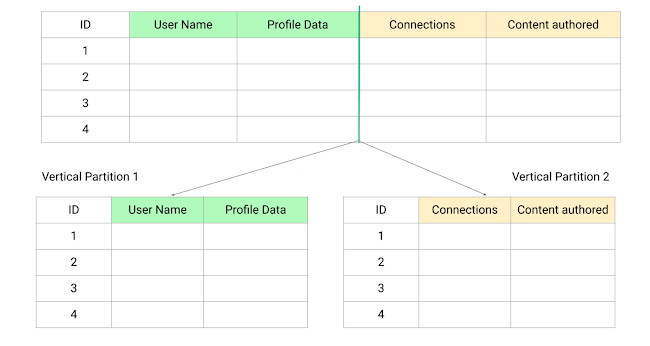
Advantage:
1. Vertical partitioning allows us to store different types of data in separate partitions. This can be useful in situations where some data is more critical or sensitive than other data. For example, we could store passwords, salary information, and other sensitive data in a separate partition to provide additional security controls.
2. Vertical partitioning can also be beneficial when our database is stored on a solid-state drive (SSD). If certain columns in the database are not frequently queried, we can partition the table vertically and move those less frequently used columns to a different location. This can help to reduce the I/O and performance costs associated with fetching frequently accessed items.
3. Overall, vertical partitioning allows us to separate slow-moving data from more dynamic data. Slow-moving data is a good candidate for caching in memory, which can improve the performance of the application.
Disadvantage:
1. It may be necessary to combine data from multiple partitions to answer a query, which can increase the operational complexity of the system. For example, if a profile view request requires data from a user's profile, connections, and articles, this data will need to be retrieved from separate partitions and combined.
2. If the website experiences additional growth, it may be necessary to further partition a feature-specific database across multiple servers. This can be time-consuming and may require additional resources
Image and some resources taken from internet. Specially Thanks to EnjoyAlgorithms
Mahfujul Hasan | Software Engineer | LinkendIn
Comments
Post a Comment